
Security for Services: OWASP and ASP.NET Core Identity, OAuth2/OpenID Connect
1. What is OWASP?
OWASP (Open Worldwide Application Security Project) is a global nonprofit organization focused on improving software security.
Most famous for:
- OWASP Top 10 (Top web application security risks)
- Security testing standards
- Threat modeling guidance
- Secure coding practices
- API Security Top 10

2. What is OWASP Used For?
OWASP is used to:
- Identify common vulnerabilities
- Build secure applications
- Design secure architectures
- Perform security audits
- Train developers
- Improve DevSecOps practices
3. OWASP Top 10 (Service-Level Risks)
Here are the most critical risks affecting APIs and microservices:
| Risk | What It Means | Example |
|---|---|---|
| Broken Access Control | Unauthorized access | User accesses admin endpoint |
| Broken Authentication | Weak login/session | JWT not validated |
| Injection | SQL/Command injection | Raw SQL input |
| Security Misconfiguration | Default configs exposed | Open S3 bucket |
| Cryptographic Failures | No encryption | Passwords in plain text |
| Insecure Design | No threat modeling | No rate limiting |
| Logging Failures | No monitoring | Brute-force undetected |
4. Why OWASP is Important for Services (Microservices/API)
Modern systems are:
- Cloud-native
- API-first
- Microservice-based
- Token-based (JWT)
- Deployed in Kubernetes
Without OWASP controls:
❌ Tokens can be forged
❌ APIs can be abused
❌ Sensitive data can leak
❌ Admin endpoints can be accessed
OWASP provides structured defense strategy.
5. Business Use Case
Case: FinTech Payment Platform
Business Requirements:
- Secure login
- Protect payment APIs
- Prevent fraud
- Ensure compliance (PCI DSS)
- Monitor abnormal behavior
OWASP Implementation:
| OWASP Control | Business Benefit |
|---|---|
| Rate limiting | Prevent DDoS |
| JWT validation | Stop token forgery |
| Role-based access | Prevent privilege escalation |
| Encryption (TLS) | Protect card data |
| Logging & alerts | Detect fraud attempts |
| Secure headers | Prevent XSS |
6. OWASP-Based Service Security Architecture
Here is the architecture image for OWASP-based service security:
👉 The architecture includes:
- Internet
- Web Application Firewall (WAF)
- API Gateway
- Authentication Service
- Microservices
- Database
- Logging & Monitoring
- Security controls layer
What is ASP.NET Core Identity?
ASP.NET Core Identity is a membership system that provides:
- User registration
- Password hashing
- Login / Logout
- Role management
- Claims-based authorization
- MFA (Multi-Factor Authentication)
- Account lockout
- Security stamp validation

It is primarily for authentication and user management inside your application.
It does NOT itself provide token-based API security unless integrated with OAuth2/OIDC providers like:
- OpenIddict
- IdentityServer
- Azure AD
- Auth0

2. Core Security Concepts (Enterprise View)
A) Authentication vs Authorization
| Concept | Meaning | Example |
|---|---|---|
| Authentication | Who are you? | Login with username/password |
| Authorization | What can you access? | Admin dashboard vs user dashboard |
ASP.NET Core Identity handles both using:
- Claims
- Roles
- Policies
B) OWASP Security Principles (Very Important)
OWASP defines top security risks like:
- Broken authentication
- Broken access control
- Security misconfiguration
- Injection attacks
- Sensitive data exposure
When implementing Identity in real systems, we must:
- Hash passwords using PBKDF2
- Use HTTPS only
- Use Anti-forgery tokens
- Enable Account Lockout
- Implement password policy
- Secure cookies
- Rotate tokens
- Validate JWT signature
3. High-Level Architecture Overview
Scenario: E-commerce Platform with API + Microservices
[Client Browser / Mobile App]
            |
            v
[API Gateway]
            |
            v
[Identity Server (ASP.NET Core Identity + OpenIddict)]
            |
            v
[User DB]
            |
            v
[Microservices]
  - Order Service
  - Payment Service
  - Product Service
4. Authentication Flow (OAuth2 + OIDC)
- User logs in.
- Identity verifies credentials.
- Identity issues:
- Access Token (JWT)
- Refresh Token
- Client sends JWT to API.
- API validates:
- Signature
- Expiration
- Claims
- API authorizes based on role/policy.
5. Detailed Architecture Components
a) Identity Layer
- ASP.NET Core Identity
- EF Core (User store)
- Password hashing
- Role management
- Claims management
b) Authorization Server (OIDC)
OpenIddict
Handles:
- Token issuing
- Client validation
- OAuth2 flows:
- Authorization Code
- Client Credentials
- Refresh Token
c) Resource Server (Protected APIs)
Uses:
builder.Services.AddAuthentication("Bearer")
    .AddJwtBearer(options =>
    {
        options.Authority = "https://identity.myapp.com";
        options.Audience = "api";
    });
This ensures:
- Only valid tokens can access API
- Expired tokens are rejected
- Tampered tokens are rejected
6) Authorization Strategies
A) Role-Based Access Control (RBAC)
[Authorize(Roles = "Admin")]
Used when:
- Simple permission model
- Clear user hierarchy
Example:
- Admin
- Manager
- Customer
B) Policy-Based Authorization (Recommended)
[Authorize(Policy = "CanManageOrders")]
Defined as:
options.AddPolicy("CanManageOrders", policy =>
    policy.RequireClaim("Permission", "Order.Write"));
Used in:
- Enterprise SaaS
- Multi-tenant systems
- Complex permissions
7) Business Use Case (Real-Time Enterprise Example)
Case: FinTech Payment Platform
Requirements:
- Customers login
- Admin manage transactions
- External partner API integration
- Mobile app authentication
- Token-based API security
Solution:
| Layer | Technology |
|---|---|
| Identity | ASP.NET Core Identity |
| Token Service | OpenIddict |
| API Protection | JWT Bearer |
| Database | SQL Server |
| Frontend | React |
| Mobile | Flutter |
Security Features:
- MFA for Admin
- Short-lived Access Tokens (5 min)
- Refresh Tokens rotation
- Account Lockout after 5 attempts
- Role + Policy authorization
- Audit logging
8) Microservices Security Pattern
Recommended Pattern:
Central Identity Server
        |
        v
JWT issued
        |
        v
Microservices validate token locally
Why?
- Stateless validation
- No DB call needed per request
- Scales easily
- Works with Kubernetes / EKS
Since you work with EKS and DevOps pipelines, this pattern is ideal for:
- Kubernetes
- API Gateway
- Cloud-native architecture
8) Zero Trust Security Model
Modern architecture follows:
- Never trust
- Always verify
- Validate every request
Every microservice validates:
- JWT signature
- Issuer
- Audience
- Expiration
- Required claims
9) Security Hardening Checklist (Production)
✔ Enforce HTTPS
✔ Secure cookies (HttpOnly, SameSite)
✔ Implement CORS correctly
✔ Use Data Protection API
✔ Encrypt connection strings
✔ Enable ASP.NET Core Rate Limiting
✔ Enable logging & monitoring
✔ Use secrets manager
✔ Rotate signing keys
✔ Use separate DB for Identity
10) Enterprise Architecture Diagram (Textual Overview)
                    Internet
                       |
                [ Cloud Load Balancer ]
                       |
                [ API Gateway ]
                       |
         --------------------------------
         |                              |
[ Identity Server ]           [ Resource APIs ]
         |                              |
   [ Identity DB ]               [ App Databases ]
a) When Should You Use ASP.NET Core Identity?
Use it when:
- You build your own authentication system
- You need full control over user store
- You need custom claims
- You build SaaS applications
- You need RBAC/Policy support
- You need OAuth2/OIDC integration
SECTION 3: OVERVIEW of OAuth2

OAuth 2.0 – Complete Explanation with Business Use Case
1. What is OAuth 2.0?
OAuth 2.0 is an authorization framework that allows applications to obtain limited access to user resources without sharing passwords.
Core Idea:
“Grant access using tokens instead of credentials.”
Instead of:
- Sharing username/password
OAuth2 uses:
- Access Tokens (JWT or opaque token)
2. Why OAuth2 Was Created
Traditional architecture problem:
- Applications store user passwords.
- Multiple systems need access.
- Security risk increases.
- Hard to manage revocation.
OAuth2 solves:
- Delegated access
- Token-based authorization
- Centralized security
- Scoped permissions
- Secure API communication
3. Key Components in OAuth2
| Role | Description |
|---|---|
| Resource Owner | User |
| Client | Web/Mobile app |
| Authorization Server | Issues tokens |
| Resource Server | Protected API |
4. How OAuth2 Works (Authorization Code Flow – Simplified)
Step-by-step:
- User clicks Login.
- Client redirects user to Authorization Server.
- User authenticates.
- Authorization Server returns Authorization Code.
- Client exchanges code for:
- Access Token
- Refresh Token (optional)
- Client calls API with Access Token.
- API validates token and grants access.
5. What is an Access Token?
- Short-lived
- Represents user permissions
- Contains scopes
- Sent in:
Authorization: Bearer <token>
6. What Are Scopes?
Scopes define what access is allowed.
Examples:
read:orderswrite:paymentsprofileemail
Scopes prevent over-privileged access.
7 Major OAuth2 Flows (Grant Types)
1. Authorization Code (Most Secure – Web Apps)
Used for:
- Web apps
- SPA + backend
2. Authorization Code + PKCE
Used for:
- Mobile apps
- SPAs (recommended)
3.Client Credentials
Used for:
- Service-to-service
- Microservices
4. Refresh Token
Used for:
- Long-lived sessions
OpenID Connect (OIDC) – Complete Explanation with Business Use Case

What is OIDC?
OpenID Connect (OIDC) is an authentication protocol built on top of OAuth 2.0.
If OAuth2 answers:
“What can this application access?”
OIDC answers:
“Who is the user?”
2. Why OIDC Was Created
OAuth2 only provides authorization (access delegation).
It does NOT:
- Prove user identity
- Provide login standard
- Return user profile information
OIDC extends OAuth2 by adding:
- ID Token (JWT)
- UserInfo endpoint
- Standard identity claims
- Single Sign-On (SSO)
3. What is an ID Token?
OIDC introduces a new token:
🔐 ID Token (JWT)
It contains:
sub→ User IDnameemailiss→ Issueraud→ Audienceexp→ Expiration
This token proves:
The user has authenticated successfully.
Core Components in OIDC
| Role | Description |
|---|---|
| End User | Human logging in |
| Client | Web/Mobile App |
| Identity Provider (IdP) | Authenticates user |
| Resource Server | Protected API |
5. How OIDC Works (Authorization Code + PKCE Flow)
Step-by-step Flow
- User clicks login.
- App redirects to Identity Provider.
- User authenticates (password/MFA).
- Identity Provider returns:
- ID Token (identity)
- Access Token (API access)
- App validates ID Token.
- User is logged in.
- Access Token is used to call APIs.
OWASP Top 10 Vulnerabilities (2026 Edition)
OWASP (Open Web Application Security Project) publishes the OWASP Top 10 — a globally recognized awareness document for developers and security teams outlining the most critical web application security risks.
These are especially important for you as an AWS Solution Architect / .NET architect, since they directly impact API security, cloud-native applications, and microservices.
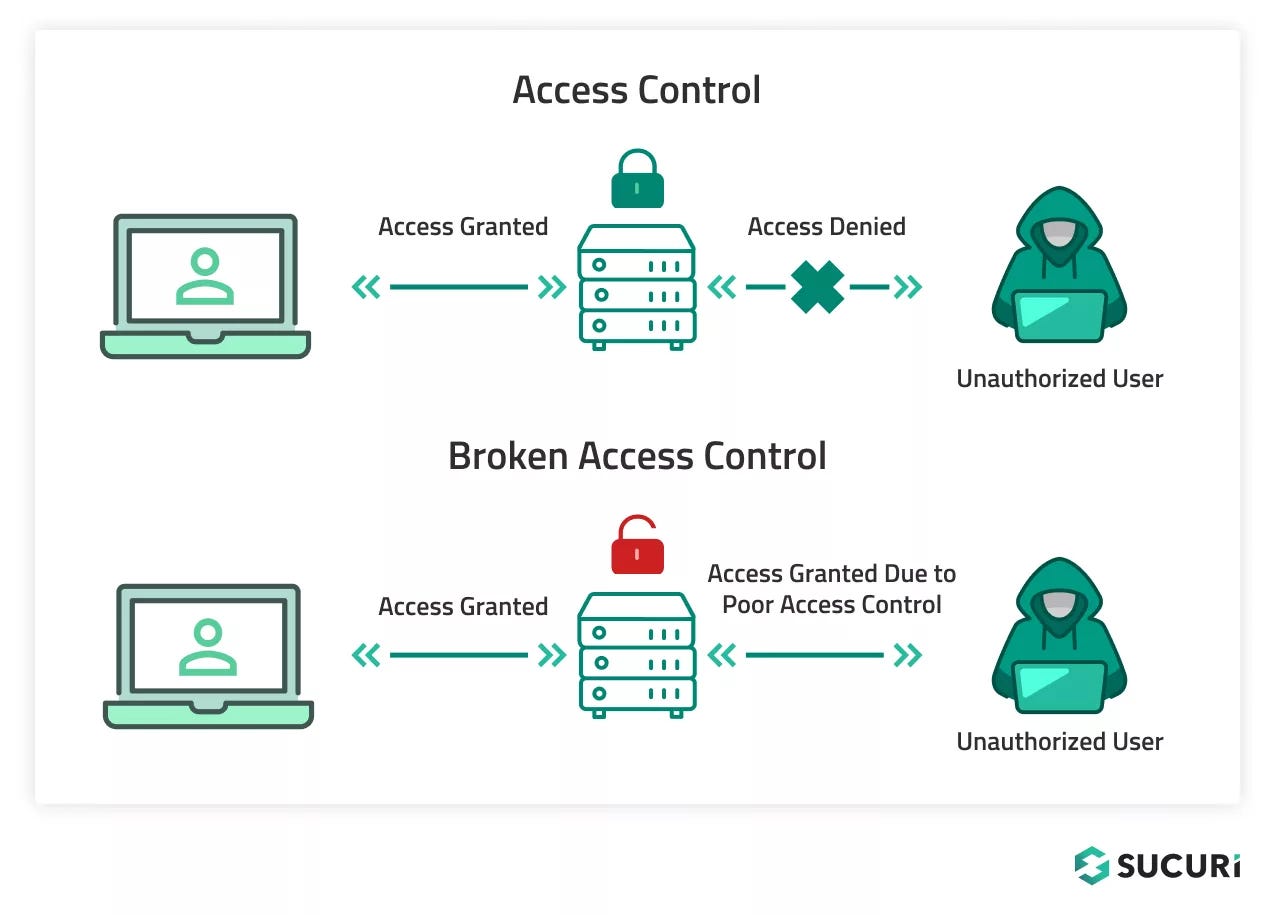
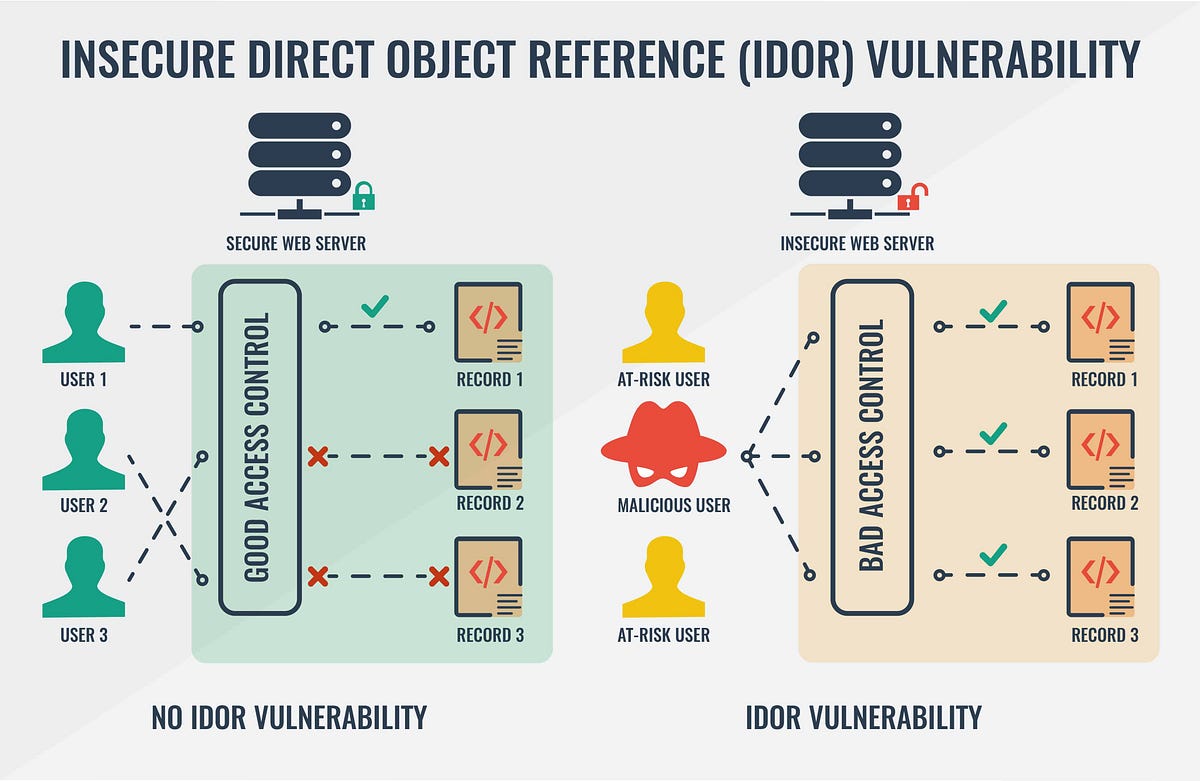
1️⃣ Broken Access Control
4
🔎 What It Means
Users can access data or functionality they should not have access to.
🔥 Examples
- IDOR (Insecure Direct Object Reference)
- Accessing
/api/admin/usersas a normal user - Horizontal privilege escalation
🏢 Business Impact
- Data breach
- Unauthorized transactions
- Regulatory fines (GDPR, PCI-DSS)
🛠 Mitigation (.NET Example)
- Use
[Authorize(Roles="Admin")] - Implement policy-based authorization
- Validate access at controller + service layer
- Avoid trusting client-side checks
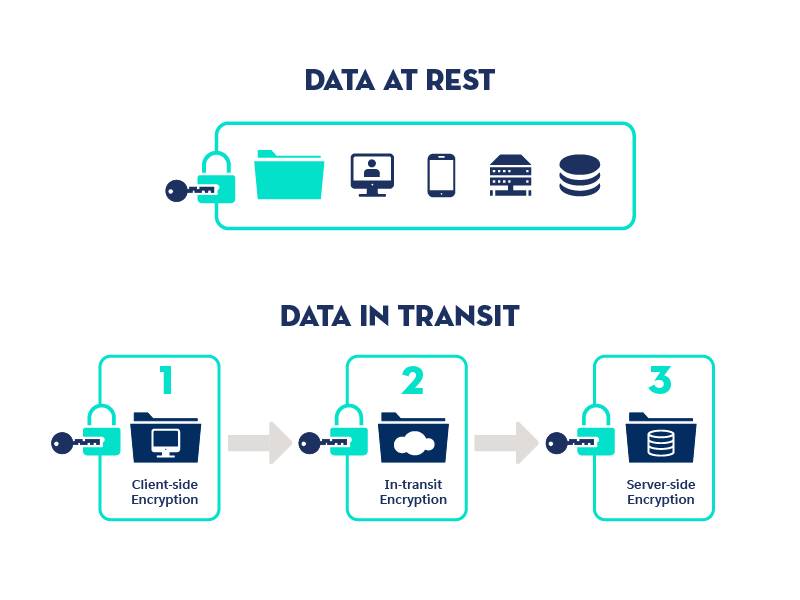
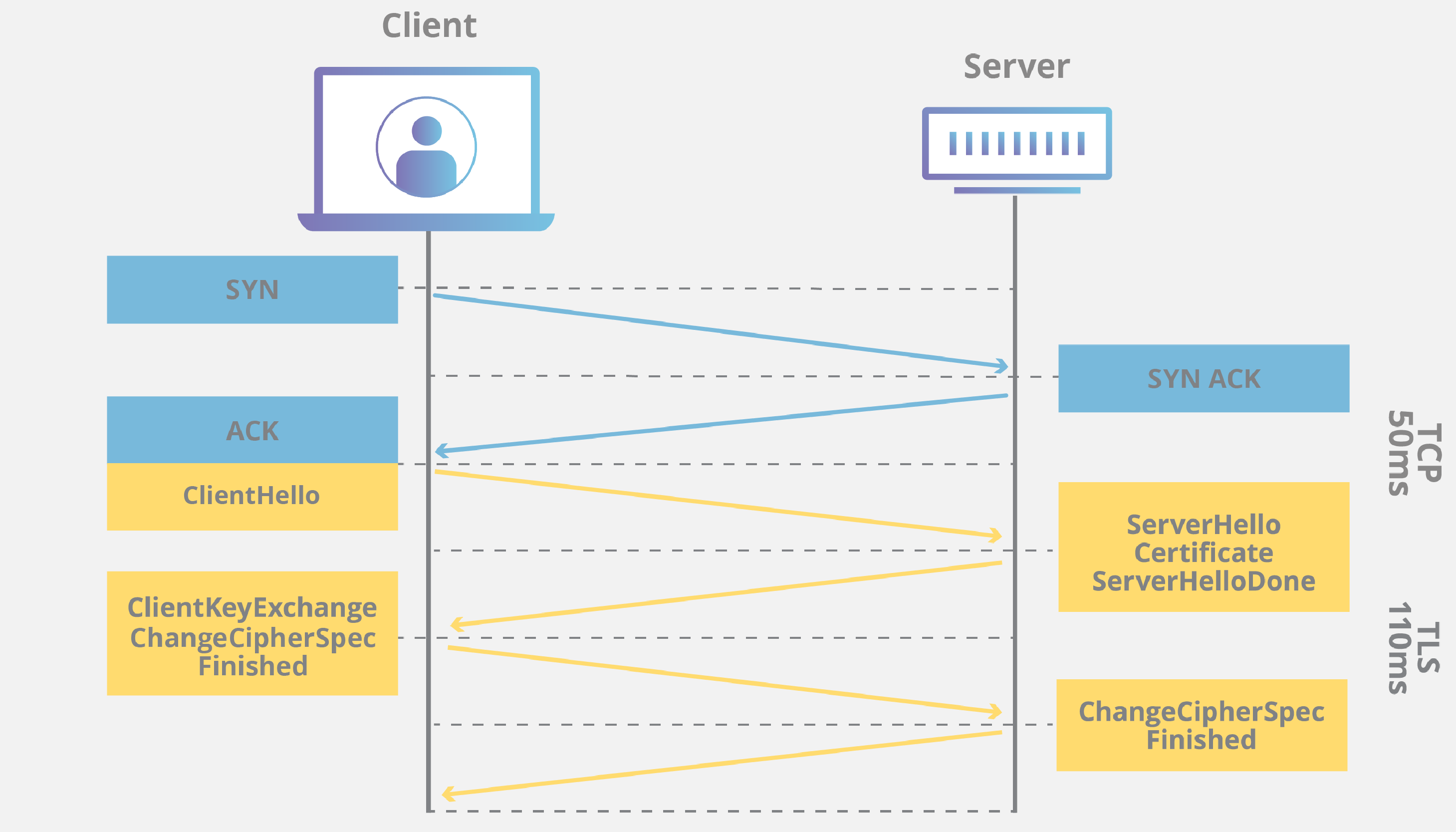
2️⃣ Cryptographic Failures
4
🔎 What It Means
Sensitive data exposed due to weak or missing encryption.
🔥 Examples
- Storing passwords in plain text
- Using HTTP instead of HTTPS
- Weak hashing like MD5
🏢 Business Impact
- Credential theft
- Financial fraud
- Compliance failure
🛠 Mitigation
- Use TLS 1.2+
- Hash passwords with PBKDF2 / BCrypt
- Enable encryption at rest (AWS KMS + RDS)
- Avoid custom crypto
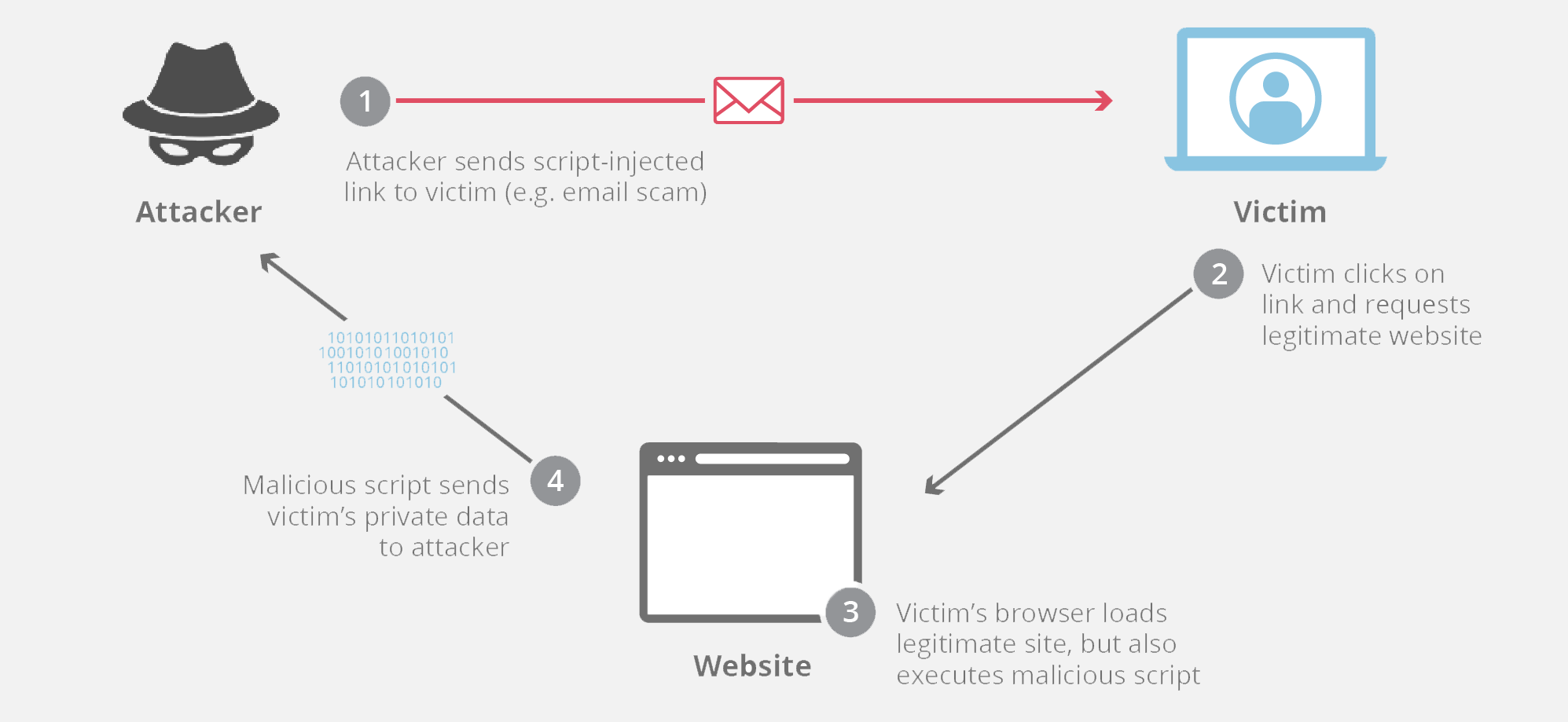
3️⃣ Injection

4
🔎 What It Means
Untrusted input sent to interpreter (SQL, NoSQL, OS commands).
🔥 Examples
SELECT * FROM Users WHERE Username = 'admin' OR 1=1;
- SQL Injection
- XSS
- Command Injection
🏢 Business Impact
- Full database compromise
- Remote code execution
🛠 Mitigation
- Use parameterized queries (EF Core)
- Input validation
- Output encoding
- Use ORM properly
4️⃣ Insecure Design
🔎 What It Means
Architectural-level security flaws.
🔥 Examples
- No rate limiting
- No fraud detection
- Weak password policy
🏢 Business Impact
- Logic abuse
- Business logic exploitation
🛠 Mitigation
- Threat modeling
- Secure SDLC
- Rate limiting (API Gateway / ASP.NET middleware)
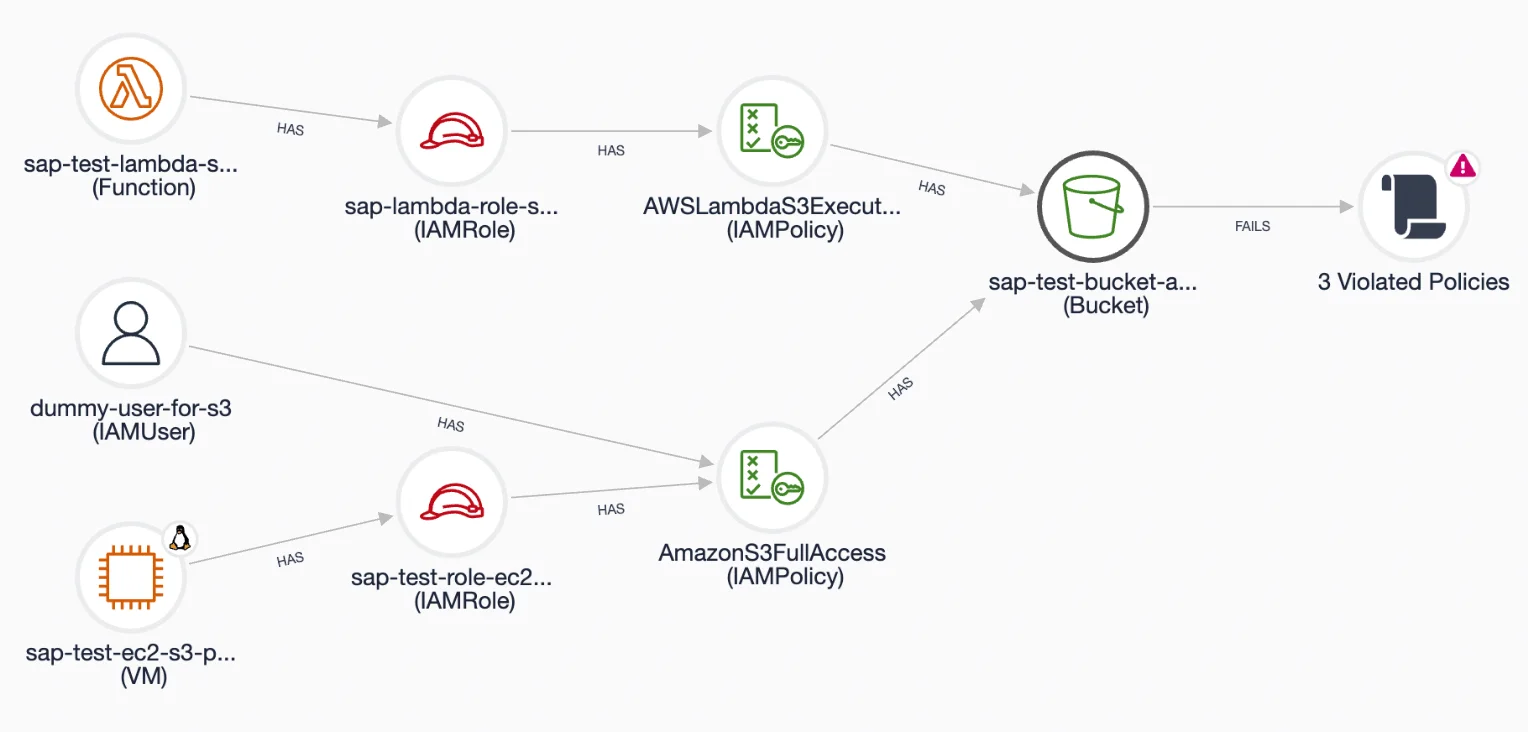
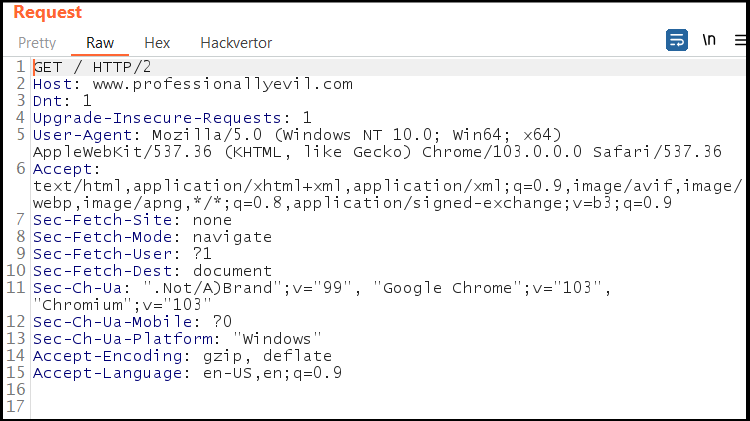
5️⃣ Security Misconfiguration

4
🔎 What It Means
Improperly configured systems.
🔥 Examples
- Public S3 bucket
- Debug mode enabled in production
- Missing security headers
🏢 Business Impact
- Data exposure
- System compromise
🛠 Mitigation
- Harden servers
- Disable default accounts
- Enable security headers
- Use IaC scanning (Terraform Checkov)
6️⃣ Vulnerable and Outdated Components
🔎 What It Means
Using libraries with known vulnerabilities.
🔥 Examples
- Old Log4j
- Deprecated NuGet packages
🛠 Mitigation
- Dependabot
dotnet list package --vulnerable- Container scanning (Trivy)
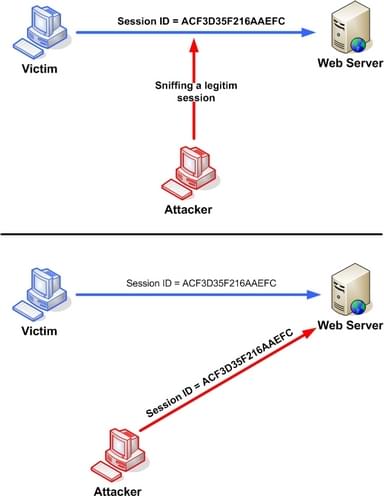
7️⃣ Identification and Authentication Failures
4
🔎 What It Means
Weak login/session management.
🔥 Examples
- No MFA
- Session ID in URL
- Weak password policy
🛠 Mitigation
- ASP.NET Core Identity
- MFA
- Short session timeout
- OAuth2 + OpenID Connect
8️⃣ Software and Data Integrity Failures
🔎 What It Means
Untrusted updates or CI/CD pipeline compromise.
🔥 Examples
- Malicious npm package
- Tampered Docker image
🛠 Mitigation
- Signed packages
- CI/CD pipeline security
- Artifact validation
9️⃣ Security Logging and Monitoring Failures
🔎 What It Means
No visibility into attacks.
🔥 Examples
- No login failure logs
- No alerting
🛠 Mitigation
- Central logging (ELK, CloudWatch)
- SIEM integration
- Audit trail enabled
🔟 Server-Side Request Forgery (SSRF)

4
🔎 What It Means
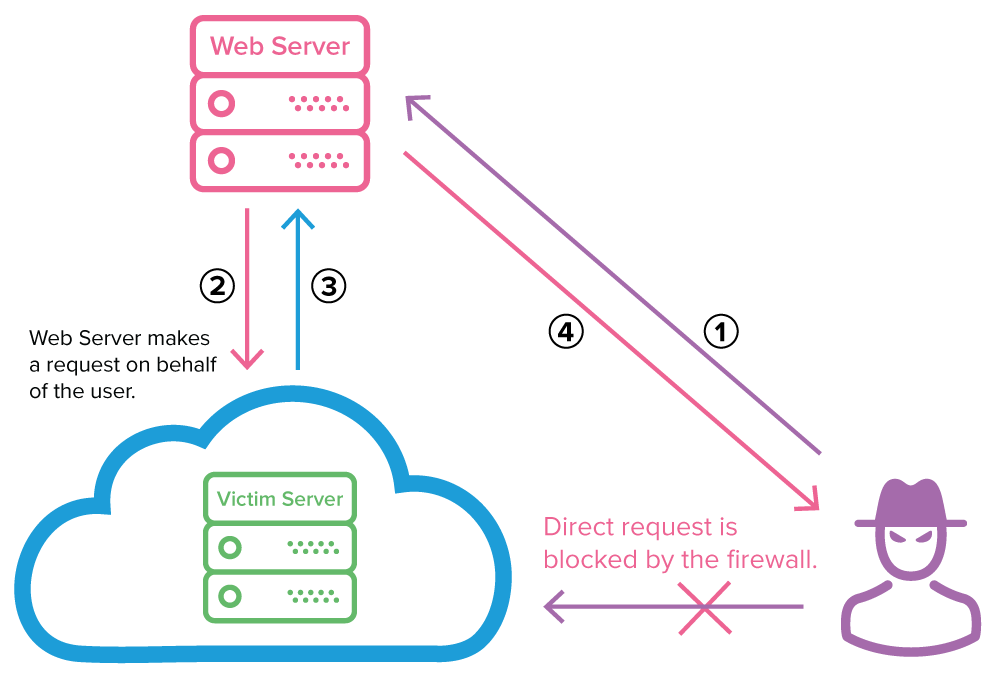
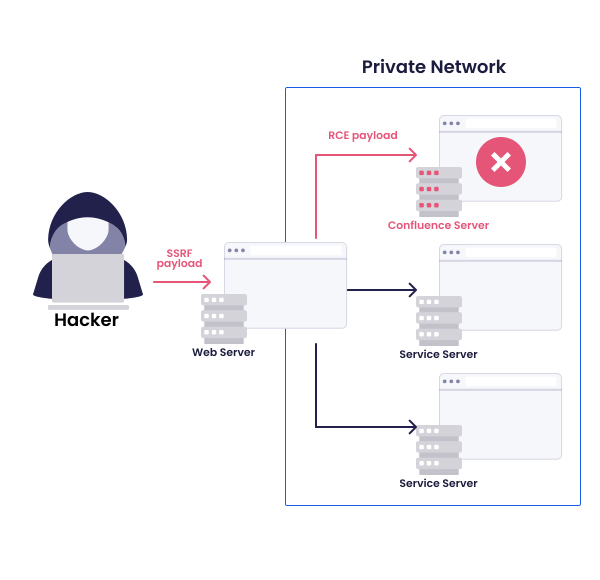
Attacker tricks server into calling internal services.
🔥 Example
http://169.254.169.254/latest/meta-data/
🛠 Mitigation
- Disable unnecessary URL fetch
- Block internal IP ranges
- Use IMDSv2 (AWS)