
Blue-Green Deployment on AWS ECS: Architecture, Benefits, and Real-Time Use Cases
What is Blue-Green Deployment?
- Two identical environments: Blue (current) and Green (new version)
- Only one environment serves live production traffic
- New version is deployed to the inactive environment (Green)
- After validation, traffic is switched from Blue → Green
- Enables zero/near-zero downtime deployments
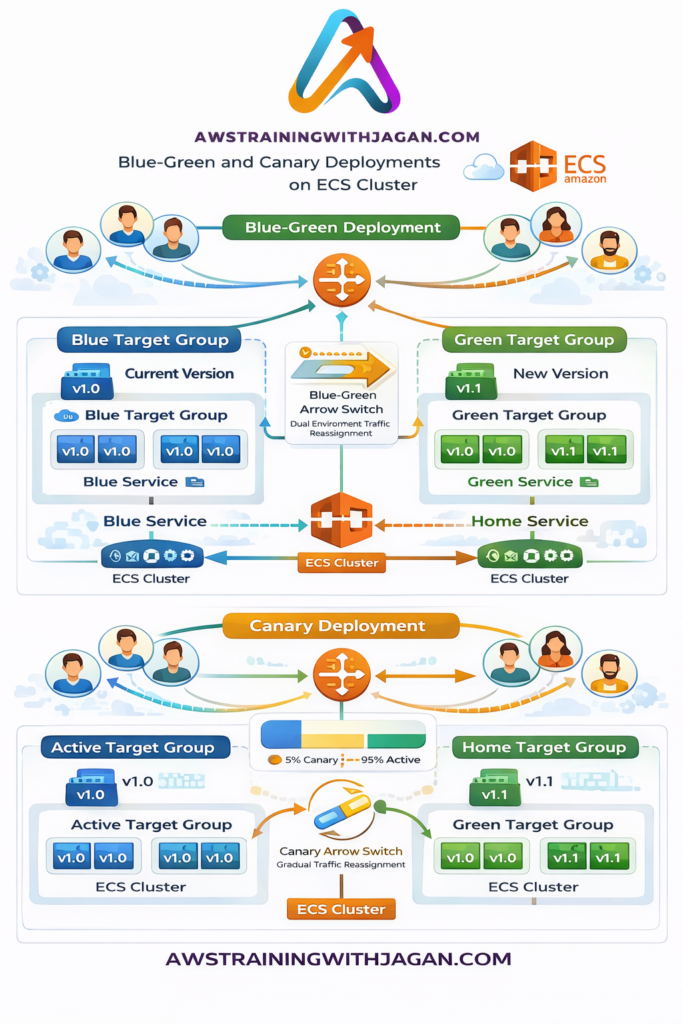
The diagram represents how Blue-Green deployment works on an Amazon ECS cluster to ensure zero downtime and safe releases.
How it Works on ECS
- ECS runs containers in two target groups (Blue & Green)
- Application Load Balancer (ALB) routes traffic
- Current traffic → Blue target group (v1.0)
- New version deployed → Green target group (v2.0)
- Validate Green (health checks, testing)
- Switch traffic using:
- ALB listener update OR
- AWS CodeDeploy automation
- Rollback = switch traffic back to Blue instantly
Key Benefits
- Zero downtime deployments
- Instant rollback capability
- Safe testing in production-like environment
- Clear separation between old and new versions
- Reduces deployment risk significantly
Core Components in the Diagram
- Users / Clients
- End users sending requests to the application
- Application Load Balancer (ALB)
- Central traffic router
- Decides whether traffic goes to Blue or Green environment
- Blue Target Group (Current Version)
- Runs the existing production version (v1.0)
- Actively serving all user traffic
- Green Target Group (New Version)
- Runs the new application version (v1.1)
- Initially receives no production traffic
- ECS Cluster
- Hosts containerized applications
- Runs services for both Blue and Green environments
- Traffic Switch Mechanism
- Either manual (ALB listener update) or automated (CodeDeploy)
- Moves traffic from Blue → Green
Step-by-Step Flow (As per Diagram)
Current State (Blue Active)
- Users send requests → ALB
- ALB routes 100% traffic → Blue Target Group
- Blue ECS service runs stable version (v1.0)
Deploy New Version (Green)
- New version (v1.1) deployed to Green Target Group
- Runs in parallel inside ECS cluster
- No production traffic yet
Validation Phase
- Perform:
- Health checks
- Functional testing
- Performance validation
- Ensure Green environment is stable
Traffic Switch (Cutover)
- ALB switches traffic:
- From Blue → Green
- Now:
- Green becomes active production
- Blue becomes standby
Rollback (If Needed)
- If issues detected:
- Instantly route traffic back to Blue
- No redeployment required → very fast recovery
What the Diagram Highlights
- Parallel environments (Blue & Green)
- Clear separation of current vs new version
- Safe validation before release
- Instant traffic switching
- High availability and zero downtime
Real-Time Example
👉 Scenario: E-Commerce Website Deployment
- Current version (Blue): v1.0 checkout system
- New version (Green): v2.0 with faster payment gateway
Deployment Flow:
- Deploy v2.0 to Green ECS service
- Run tests (API, UI, payment validation)
- Monitor:
- Error rate
- Response time
- Payment success rate
- Once stable → switch traffic to Green
- If issue detected → rollback to Blue in seconds
Business Impact:
- No downtime during deployment
- Customers continue shopping without interruption
- Revenue loss avoided
Key Takeaway
The architecture ensures that:
- Users never experience downtime
- New releases are tested in real production-like conditions
- Rollbacks are quick and low-risk
Sample Terraform for ECS Blue-Green Foundations
This sample creates the base components needed for ECS with two target groups. It is a simplified example to show the structure.
provider "aws" {
  region = "ap-south-1"
}

variable "vpc_id" {}
variable "public_subnets" {
  type = list(string)
}
variable "ecs_security_group_id" {}
variable "alb_security_group_id" {}

resource "aws_ecs_cluster" "main" {
  name = "demo-ecs-cluster"
}

resource "aws_lb" "app_alb" {
  name               = "demo-app-alb"
  internal           = false
  load_balancer_type = "application"
  security_groups    = [var.alb_security_group_id]
  subnets            = var.public_subnets
}

resource "aws_lb_target_group" "blue" {
  name        = "demo-blue-tg"
  port        = 80
  protocol    = "HTTP"
  vpc_id      = var.vpc_id
  target_type = "ip"

  health_check {
    path                = "/health"
    matcher             = "200"
    interval            = 30
    timeout             = 5
    healthy_threshold   = 2
    unhealthy_threshold = 3
  }
}

resource "aws_lb_target_group" "green" {
  name        = "demo-green-tg"
  port        = 80
  protocol    = "HTTP"
  vpc_id      = var.vpc_id
  target_type = "ip"

  health_check {
    path                = "/health"
    matcher             = "200"
    interval            = 30
    timeout             = 5
    healthy_threshold   = 2
    unhealthy_threshold = 3
  }
}

resource "aws_lb_listener" "prod" {
  load_balancer_arn = aws_lb.app_alb.arn
  port              = 80
  protocol          = "HTTP"

  default_action {
    type             = "forward"
    target_group_arn = aws_lb_target_group.blue.arn
  }
}

resource "aws_ecs_task_definition" "app" {
  family                   = "demo-app"
  network_mode             = "awsvpc"
  requires_compatibilities = ["FARGATE"]
  cpu                      = 256
  memory                   = 512
  execution_role_arn       = aws_iam_role.ecs_task_execution.arn
  task_role_arn            = aws_iam_role.ecs_task_execution.arn

  container_definitions = jsonencode([
    {
      name      = "app"
      image     = "nginx:latest"
      essential = true
      portMappings = [
        {
          containerPort = 80
          hostPort      = 80
          protocol      = "tcp"
        }
      ]
    }
  ])
}

resource "aws_ecs_service" "app" {
  name            = "demo-app-service"
  cluster         = aws_ecs_cluster.main.id
  task_definition = aws_ecs_task_definition.app.arn
  desired_count   = 2
  launch_type     = "FARGATE"

  deployment_controller {
    type = "CODE_DEPLOY"
  }

  network_configuration {
    subnets          = var.public_subnets
    security_groups  = [var.ecs_security_group_id]
    assign_public_ip = true
  }

  load_balancer {
    target_group_arn = aws_lb_target_group.blue.arn
    container_name   = "app"
    container_port   = 80
  }

  lifecycle {
    ignore_changes = [task_definition, load_balancer]
  }
}

resource "aws_iam_role" "ecs_task_execution" {
  name = "demo-ecs-task-execution-role"

  assume_role_policy = jsonencode({
    Version = "2012-10-17"
    Statement = [
      {
        Effect = "Allow"
        Principal = {
          Service = "ecs-tasks.amazonaws.com"
        }
        Action = "sts:AssumeRole"
      }
    ]
  })
}

resource "aws_iam_role_policy_attachment" "ecs_task_execution" {
  role       = aws_iam_role.ecs_task_execution.name
  policy_arn = "arn:aws:iam::aws:policy/service-role/AmazonECSTaskExecutionRolePolicy"
}

resource "aws_codedeploy_app" "ecs" {
  name             = "demo-ecs-codedeploy-app"
  compute_platform = "ECS"
}

resource "aws_iam_role" "codedeploy_role" {
  name = "demo-codedeploy-role"

  assume_role_policy = jsonencode({
    Version = "2012-10-17"
    Statement = [
      {
        Effect = "Allow"
        Principal = {
          Service = "codedeploy.amazonaws.com"
        }
        Action = "sts:AssumeRole"
      }
    ]
  })
}

resource "aws_iam_role_policy_attachment" "codedeploy_role_attach" {
  role       = aws_iam_role.codedeploy_role.name
  policy_arn = "arn:aws:iam::aws:policy/AWSCodeDeployRoleForECS"
}

resource "aws_lb_listener" "test" {
  load_balancer_arn = aws_lb.app_alb.arn
  port              = 8080
  protocol          = "HTTP"

  default_action {
    type             = "forward"
    target_group_arn = aws_lb_target_group.green.arn
  }
}

resource "aws_codedeploy_deployment_group" "ecs_dg" {
  app_name              = aws_codedeploy_app.ecs.name
  deployment_group_name = "demo-ecs-dg"
  service_role_arn      = aws_iam_role.codedeploy_role.arn

  deployment_config_name = "CodeDeployDefault.ECSAllAtOnce"

  deployment_style {
    deployment_type   = "BLUE_GREEN"
    deployment_option = "WITH_TRAFFIC_CONTROL"
  }

  ecs_service {
    cluster_name = aws_ecs_cluster.main.name
    service_name = aws_ecs_service.app.name
  }

  blue_green_deployment_config {
    deployment_ready_option {
      action_on_timeout = "CONTINUE_DEPLOYMENT"
    }

    terminate_blue_instances_on_deployment_success {
      action                           = "TERMINATE"
      termination_wait_time_in_minutes = 5
    }
  }

  load_balancer_info {
    target_group_pair_info {
      prod_traffic_route {
        listener_arns = [aws_lb_listener.prod.arn]
      }

      test_traffic_route {
        listener_arns = [aws_lb_listener.test.arn]
      }

      target_group {
        name = aws_lb_target_group.blue.name
      }

      target_group {
        name = aws_lb_target_group.green.name
      }
    }
  }
}
Final Thoughts
Blue-green and canary deployments on ECS are both powerful strategies for modern cloud-native delivery. Blue-green is best when you need clean separation and instant rollback, while canary is best when you want controlled, progressive exposure. The best choice depends on your release frequency, monitoring maturity, business risk tolerance, and operational goals.
For most enterprises, the real success comes not just from choosing a deployment pattern, but from combining it with strong automation, observability, rollback logic, and disciplined CI/CD practices.